

Buy your domain yourself, not from your web host

When you sign up for hosting or hire a web person, you'll often be offered a domain in the same step. "We'll grab yourbusiness.com for you." Say no thanks. Buy the domain yourself, at a domain company, in your own name, and keep it separate from your hosting.
It costs you about five extra minutes. It saves you from the day you want to switch and find you can't.
Your domain is your business phone number
The easiest way to think about a domain is as your business phone number.
Your domain (yourbusiness.com) is the number. It's what people type to reach you, and it's printed on your cards, your invoices and your email address.
DNS is call forwarding. It's a short list of settings that sends each call to the right phone: website visitors to your website, email to your inbox, bookings to your booking tool.
Your web host or web person is the phone company. They provide the phone that rings.
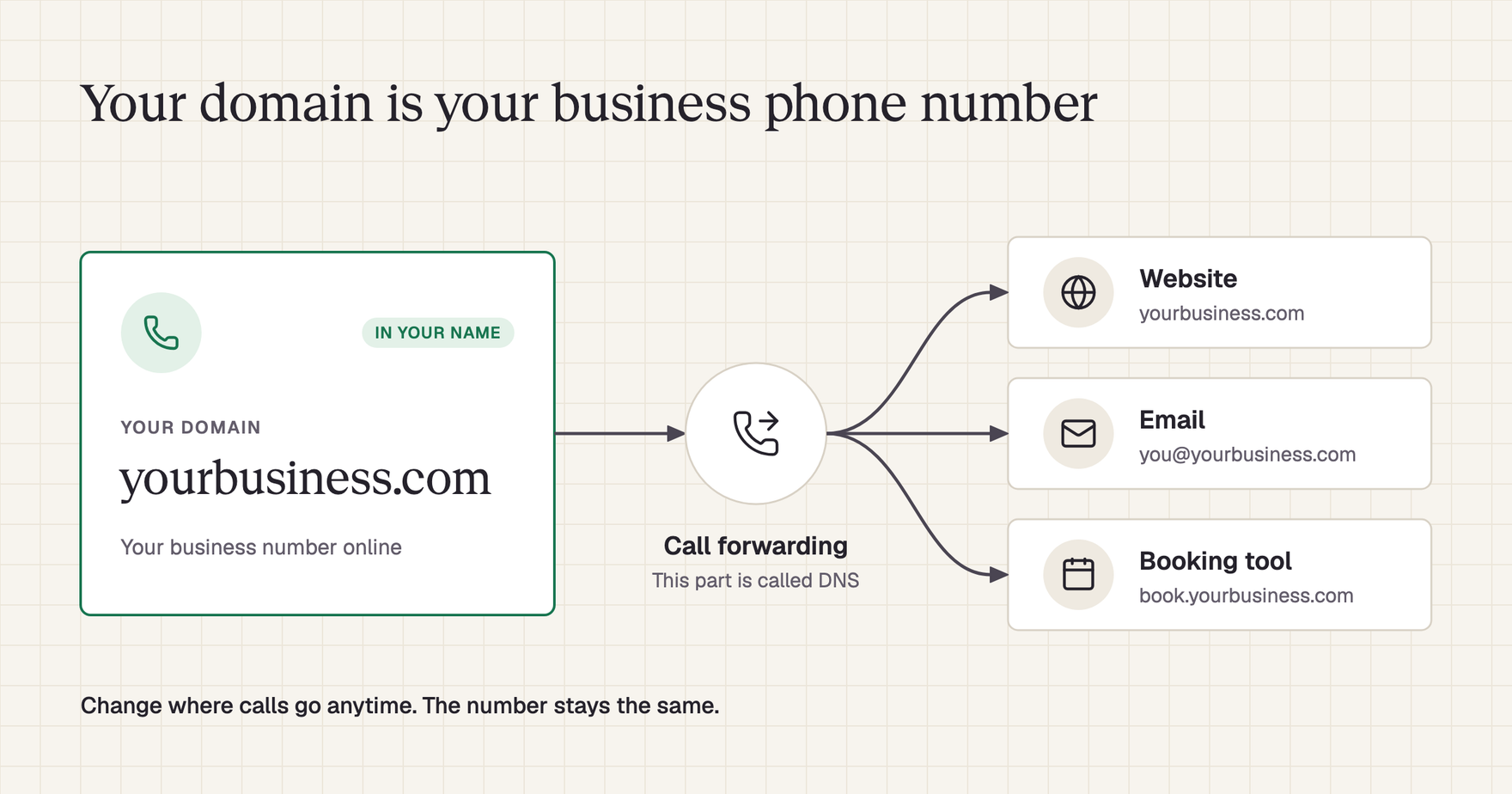
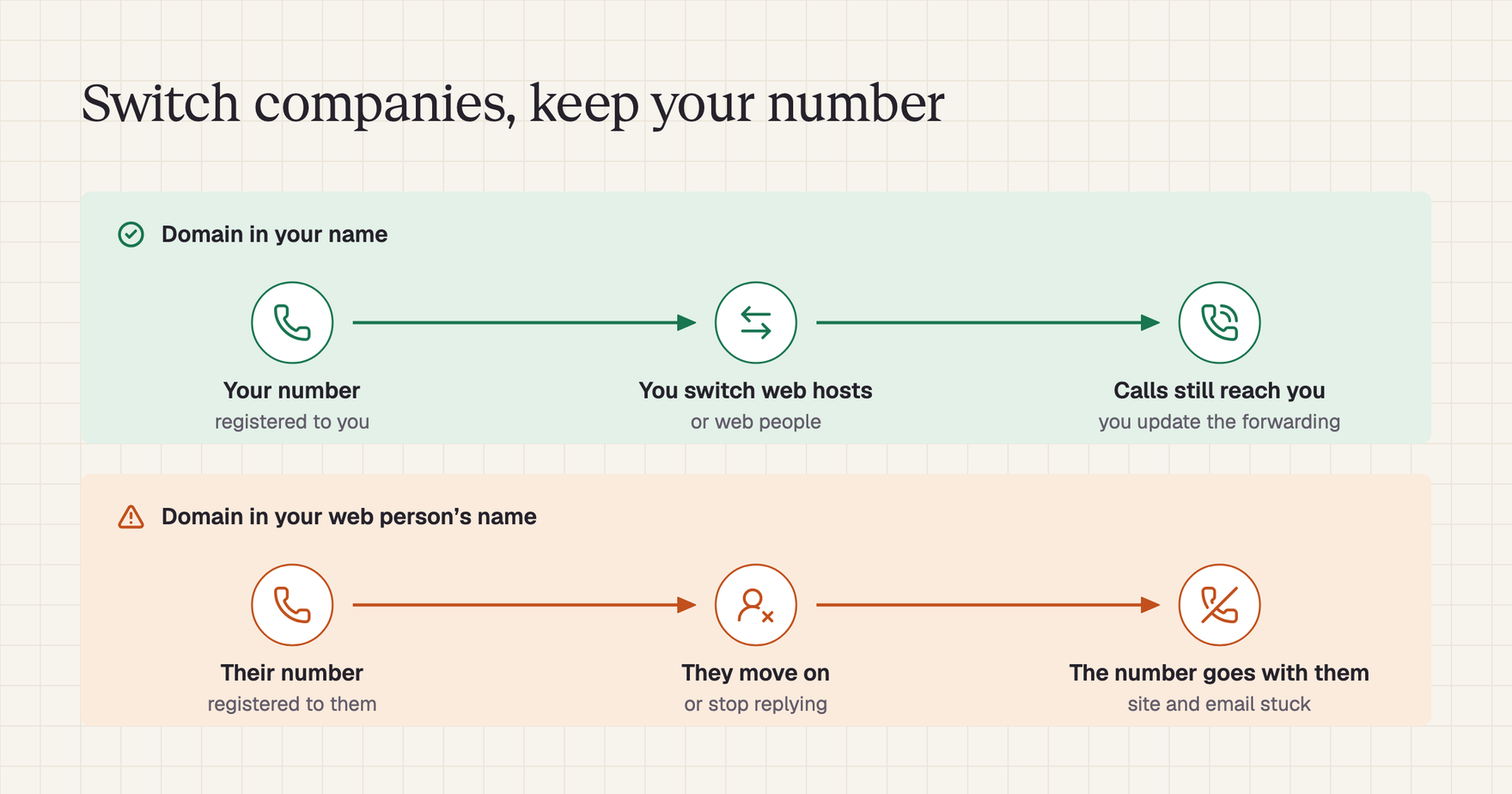
Everyone knows you can switch phone companies and keep your number. The same is true for your domain, with one condition: the number has to be in your name. If the phone company or your web person put it in their name, it's theirs to move, not yours.
Domain, DNS, hosting and email in plain words
These are four different things, and they can live at four different companies:
- Domain: the number itself. You rent it from a domain company called a registrar, like GoDaddy, Namecheap or Cloudflare.
- DNS: the call forwarding. It says where your website and email are.
- Hosting: the phone that rings. It's the computer your website runs on.
- Email: your inbox, from a service like Google Workspace or Microsoft 365.
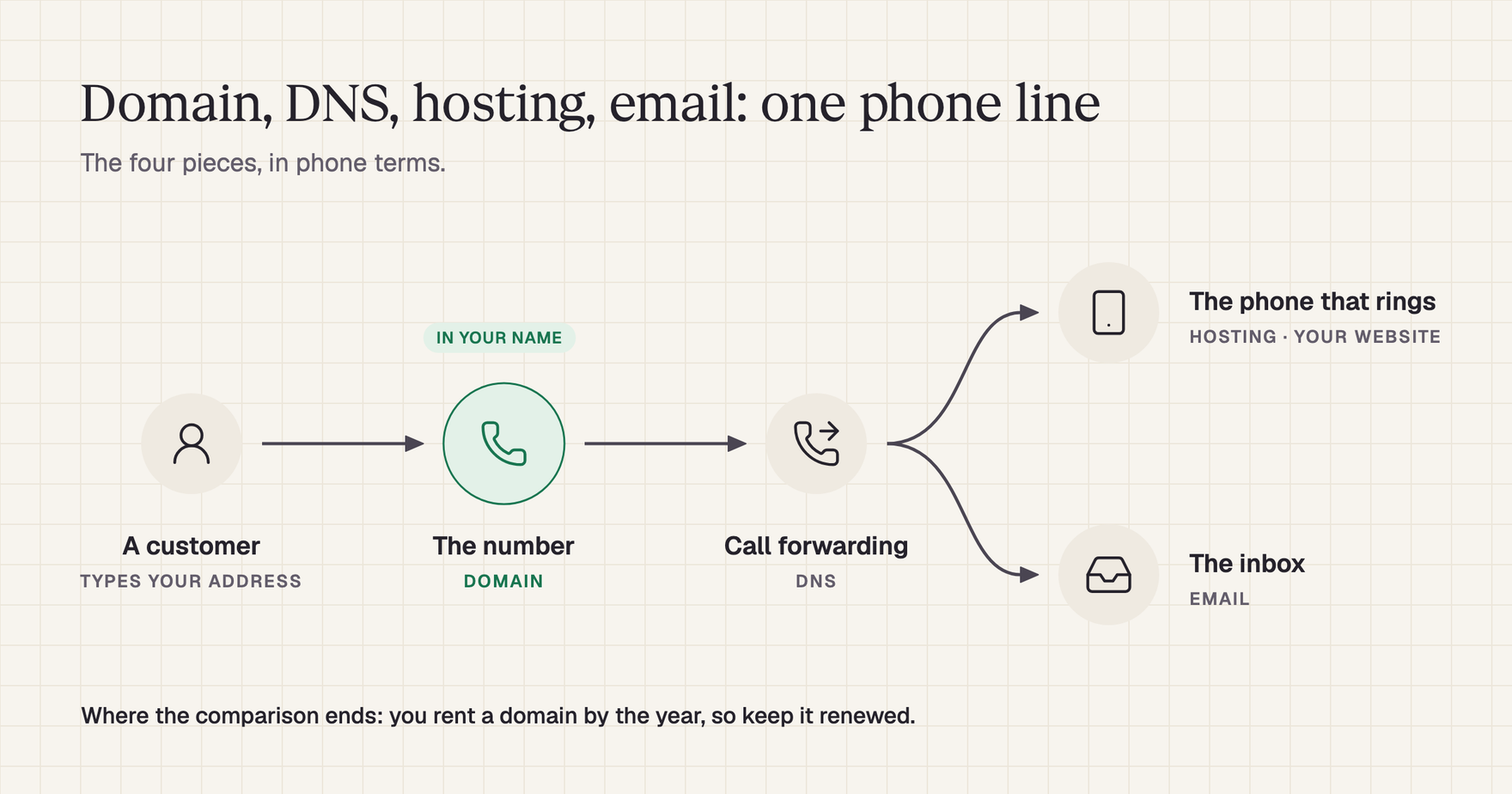
Here's where the comparison ends. You don't own a domain forever the way people think of owning a phone number. You rent it a year (or a few years) at a time. Stop renewing and you can lose it, which is why most of the checklist below is about renewals.
Why buying from your web host is tempting
Many web hosts also sell domains, and bundling looks simple: one company, one bill, one login. A web person who buys the domain for you is often just trying to save you a step.
The trouble is that convenience on day one turns into dependence later. If your host or web person holds the domain, leaving them means asking them to let go of it first. Most will. But you shouldn't need anyone's permission to move your own number.
Keeping them apart also makes switching boring, which is what you want. A new host? Change the call forwarding. A new web person? Give them access, take the old person's away. The number never moves.
What goes wrong when someone else holds it
Usually nothing, until something changes.
The renewal gets missed. The reminder goes to your web person's inbox, or the card on file runs out. After a domain expires, ICANN's rules have the registrar switch off its call forwarding before the name is deleted, so your website and email stop working. Once it's deleted, there's a 30-day window in which the registrar can still restore it. ICANN's security advisers note that after those grace periods, someone else can register the name.
Nobody can log in. The account was set up with a former employee's email, or an old agency address that no longer works. Password resets go nowhere.
It's in their name, not yours. Under ICANN's transfer rules, the registered holder is the one who can approve moving the name to another registrar. If that's your web person, you need their help.
Moving it takes longer than you'd think. When a name is changed over to a new owner, ICANN's current rules have the registrar lock it from moving to another registrar for 60 days, unless the registrar offered a way to opt out and you took it. ICANN approved changes to these transfer rules in June 2026, but they're still being put in place. Your registrar can tell you what applies to your name today.
A falling-out turns into a standoff. If the person who holds the name stops replying, or asks for money to hand it over, the business owner is left waiting. It's rare, and it's completely avoidable.
Give your web person access, not the account
Your web person will need to change your call forwarding from time to time. That's normal. They don't need your password or the domain itself to do it. Most registrars let you give someone their own login:
- GoDaddy lets you invite a "delegate," like your web designer. Delegates can use your products but can't see or change your payment methods or password.
- Namecheap has "Share Access," where you can share just DNS management and keep the rest.
- Cloudflare lets you add people as members of your account, and remove them later.
If your registrar has something like this, use it. Your web person gets what they need, and you can take it back whenever you like.
The 5-minute domain check
Do this once now, then once a year when the renewal comes up.
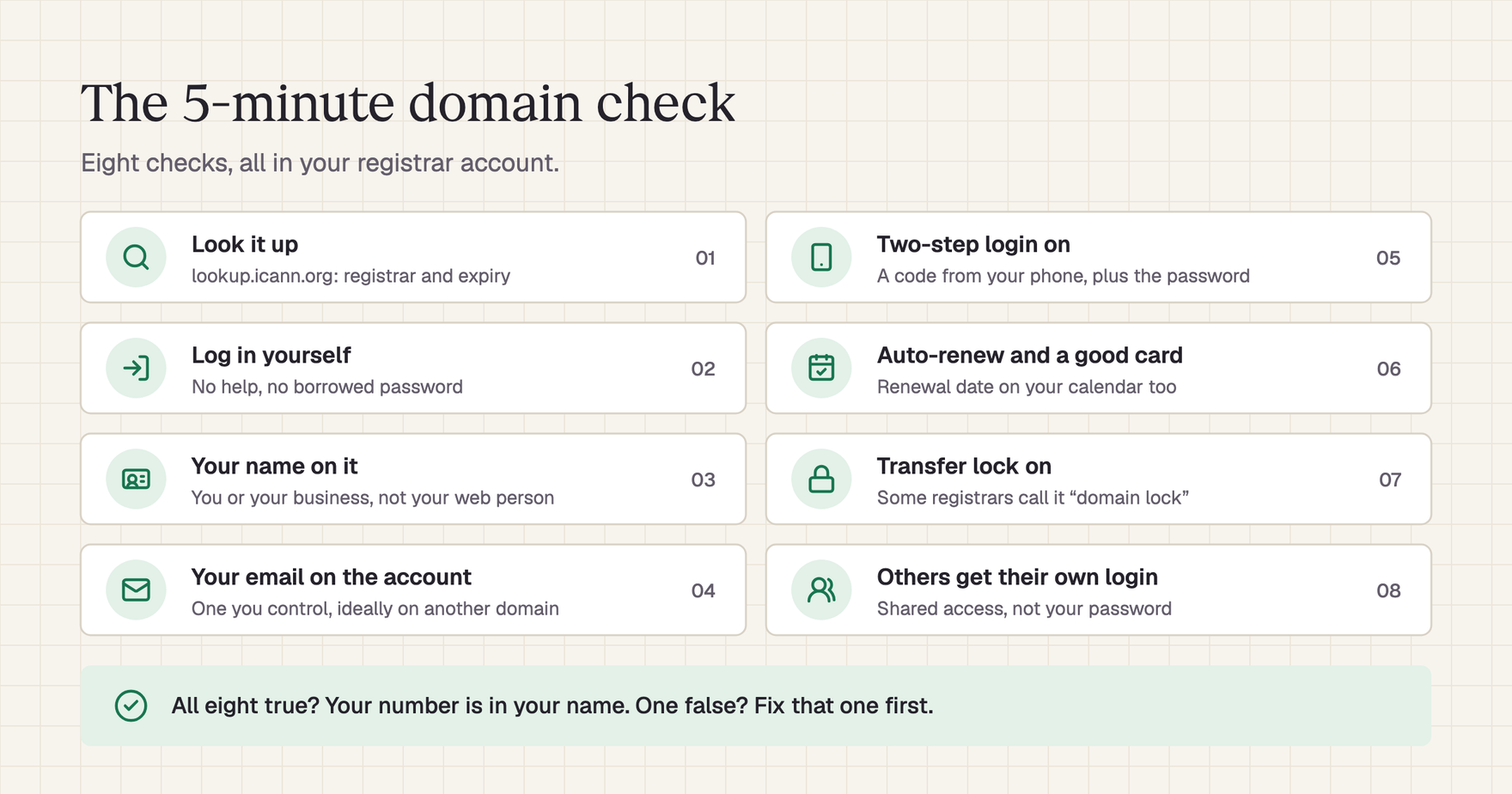
- Look it up. Type your domain into ICANN's free lookup at lookup.icann.org. It shows which registrar holds it and when it expires.
- Log in yourself. Go to that registrar and sign in, with no help and no borrowed password. If you can't, that's your first job.
- Your name on it. The owner should be you or your business, not your web person or their company.
- Your email on the account. Use an address you control. ICANN's security advisers suggest one that's not on the same domain, so a problem with the domain can't also block the warning emails.
- Two-step login on. A code from your phone on top of the password.
- Auto-renew on, with a card that won't expire soon. Then put the renewal date on your calendar as a backup.
- Transfer lock on. Some registrars call it "domain lock." It stops anyone from moving the name to another registrar without you. You can switch it off when you really want to move.
- Others get their own login. Shared or delegate access if your registrar offers it. Not your password.
If the domain turns out to be in someone else's account, don't panic. Ask them, kindly and in writing, to move it into an account in your name. Start there.
Frequently asked questions
Should I buy my domain from my web host?
We'd say no. Buy it from a registrar, in your own name, and keep it separate from hosting. Then you can change hosts without moving your domain.
Should I let my web designer buy my domain for me?
No. It's convenient, but whoever registers it controls it. Buy it yourself (it takes a few minutes), then give your designer their own access.
Who should own my domain name?
You, or your business. Put it in a registrar account you log in to yourself.
How do I find out who owns my domain?
Look it up at lookup.icann.org. It shows the registrar and the expiry date. The owner's name is often hidden for privacy, so the surest check is logging in to the registrar account yourself.
What happens if my domain expires?
Your website and email can stop working. There's a window to renew it, then a 30-day window where the registrar can restore it. After that, someone else can register it.
What's the difference between a domain and hosting?
The domain is your number. Hosting is the phone that rings, the computer your website runs on. They can be with different companies, and DNS tells calls to your number where to go.
That's why we don't sell domains at all. We'd rather you own your number from day one, whether or not you ever work with us.
Take five minutes today and do the check above. If you'd like a hand with the rest, get in touch.